Grok Bot: All Your Creds Are Belong to the Cloud
Grok Bot connects an AI agent to a computer and external services such as Gmail and Notion. You install the desktop app, connect your accounts through a browser, and let the agent work. I wanted to understand where those credentials go and what someone could do with the desktop app’s own token.
I unpacked the Linux application, version 0.71.2, traced its authentication and connector code, and tested the saved access token against the backend. The interesting boundary is between the desktop session and the cloud services that act on your behalf.
The desktop is one part of the system
The app is Electron with a React interface and bundled JavaScript. Its main process handles login, credential storage, browser callbacks, and connections to agent environments. Work can happen in a cloud VM or through a local execution daemon.
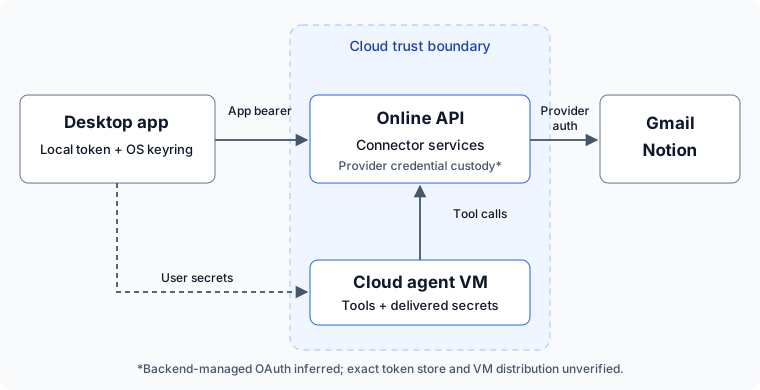
The desktop bundle exposes the client contracts. It does not expose the backend implementation, its credential database, or the VM’s deployed security controls.
Connecting Gmail does not keep Gmail local
The shared OAuth flow starts with CheckHttpMcpStatus. The desktop supplies a
connector identifier, redirect URI, and optional account or reauthentication
context. The response includes requiresAuth, hasValidToken, and an
authorization URL. When login is needed, the app opens that URL in the browser.
After provider consent, the browser returns an authorization code and state.
One supported callback is http://localhost:8787/callback, with fallback ports
if it is occupied. Web and application callbacks also exist; the selected route
depends on the integration.
The local handler requires a GET on the callback path and a matching pending state. Pending entries expire after about 14 minutes. The desktop then forwards the code to the backend:
CompleteMcpOAuth({stateId, authorizationCode}) -> accountKey
The response contains an account identifier, rather than the provider’s access
and refresh tokens. Connector availability is refreshed, and subsequent tool
requests use ExecuteSandMcpTool, authenticated with the Grok Bot token.
The request carries the connector, tool name, arguments, and agent/turn context.
Authentication failures can surface through status checks and structured tool errors, allowing the client to offer reauthentication. The pending-login watcher polls every five seconds for up to 15 minutes. That is a login-completion watch, not evidence of continuous monitoring for every connected account. Server-side state binding, token refresh, and revocation enforcement remain outside the inspected code.
That supports a backend-managed OAuth design: the cloud retains access to the provider credentials and uses them for connected-service operations. Cloud VM work can use those capabilities through the service. The client alone cannot tell us whether Gmail tokens live in a central credential store, a connector worker, or inside the VM itself. Claiming that every OAuth token is copied into the VM would go beyond the evidence.
Other credential transfers are explicit. User-entered box secrets are decrypted
locally and passed to setBoxSecrets for the configured host. Selected browser
cookies can be imported into the remote browser. The 1Password connection path
sends a service-account token to the backend. These are separate ways to give
the cloud authority over external accounts.
Gmail and Notion: different visibility
Gmail has explicit Google Workspace configuration for
gmailmcp.googleapis.com: static client registration, rejection of custom-scheme
redirects, and these authorization parameters and scopes:
// Selected values transcribed from the desktop provider configuration.
const gmail = {
  authorizationParams: {
    access_type: "offline",
    prompt: "select_account consent"
  },
  scopes: [
    "https://www.googleapis.com/auth/gmail.readonly",
    "https://www.googleapis.com/auth/gmail.compose",
    "https://www.googleapis.com/auth/gmail.modify"
  ]
};
The requested access includes mail composition and modification. This is more
than inbox search. offline requests access that can continue without the user
being present; it does not establish that a refresh token was actually issued.
The bundle shows requested permissions, not the live account’s granted scopes.
For Notion, the bundle recognizes mcp.notion.com and constructs fetch requests:
// Shortened transcription of the Notion preview adapter.
const notionAdapter = {
  ownsServer: url => url.hostname === "mcp.notion.com"
};

// Tool request constructed for a referenced Notion item.
const request = {
  toolName: "notion-fetch", args: { id: reference.id }
};
That establishes Notion integration and tool awareness. Exact consent scopes, workspace/page grants, client registration, and refresh behavior are absent from the inspected configuration. The shared OAuth machinery is present; the live Notion authorization route was not tested. A Notion connector should not be read as blanket access to every workspace or page.
The threat model
I modelled the desktop, online control plane, cloud and local execution, integrations, and their credentials. Three paths matter most:
| Starting point | What is at risk | What establishes the boundary |
|---|---|---|
| A stolen desktop session | Backend operations available to that session, potentially including connected services | Server-side account, connector, and action authorization |
| A compromised cloud execution environment | Secrets delivered there and service capabilities available to its agent | VM isolation, credential brokering, and limited grants |
| Malicious content in mail, documents, or web pages | An agent turning untrusted instructions into privileged tool calls | Permissions and approvals enforced outside the model |
Keeping raw OAuth tokens out of the desktop is useful. It does not remove the risk if a desktop session can ask the backend to use those tokens. Reading mail through a connector may be enough; an attacker need not download the Gmail refresh token first.
I found no dedicated Gmail or Notion OAuth-token export in the inspected path.
Lifting the desktop token
On this Linux installation, account credentials were stored in:
~/.config/Grok Bot/sand-secrets.json
The file had mode 0600, with token values protected by Electron safeStorage.
The saved access token used the keyring-backed v11 format.
With permission, I read the active account’s encrypted access token, obtained the matching wrapping secret from the unlocked keyring, and decrypted the token in memory. Encryption protected the file at rest; it did not prevent another process with the required file and keyring access from recovering the bearer.
I then passed that token to our Python bot-listing script. Here is the relevant request as a standalone snippet, using a hidden prompt instead of putting the token in shell history:
from getpass import getpass
import json
import sys
import urllib.request

class NoRedirects(urllib.request.HTTPRedirectHandler):
    def redirect_request(self, req, fp, code, msg, headers, newurl):
        return None

token = getpass("Grok Bot access token: ").strip()
request = urllib.request.Request(
    "https://api2.cursor.sh"
    "/aiserver.v1.GrokBotService/ListGrokBotAgents",
    data=json.dumps({"includeTeamAgents": False}).encode(),
    headers={
        "Authorization": f"Bearer {token}",
        "Content-Type": "application/json",
        "Connect-Protocol-Version": "1",
        "x-cursor-client-type": "sand",
        "x-cursor-client-version": "0.71.2",
        "x-cursor-client-os": sys.platform,
        "x-sand-box-namespace": "prod",
    },
)
with urllib.request.build_opener(NoRedirects()).open(request, timeout=20) as response:
    result = json.load(response)
for bot in result.get("agents", []):
    print(json.dumps({"id": bot.get("agentId"), "name": bot.get("name")}))
The existing desktop token successfully listed three bots from a separate Python process. No refresh token, copied machine checksum, explicit team ID, or agent ID was supplied. Neither the access token nor the keyring secret was printed or saved.
That establishes reuse outside the Grok Bot app on the same machine. I did not test replay from another machine, execute Gmail or Notion tools, or retrieve provider tokens. Those operations may have additional server checks. This is bearer-token reuse, not an authentication bypass.
All your creds are belong to the cloud
The VM receives some secrets directly; other operations go through cloud connector services. Whoever holds the desktop app token inherits whatever authority the backend grants that session. The practical question is how much of your connected world that one bearer can reach.
All your creds are belong to the cloud VM and its supporting services, or whoever holds the desktop app token, within the grants the backend accepts.
#Grok-Bot #Security #Oauth #Reverse Engineering #Threat-Model